The assets resource type stores digital representations of objects or groups of objects from the physical world. Assets are organized in hierarchies. For example, a water pump asset can be a part of a subsystem asset on an oil platform asset.
Both the rate of requests (denoted as request per second, or ‘rps’) and the number of concurrent (parallel) requests are governed by limits,
for all CDF API endpoints. If a request exceeds one of the limits,
it will be throttled with a 429: Too Many Requests response. More on limit types
and how to avoid being throttled is described
here.
Limits are defined at both the overall API service level, and on the API endpoints belonging to the service.
Some types of requests consume more resources (compute, storage IO) than others, and where a service handles
multiple concurrent requests with varying resource consumption.
For example, ‘CRUD’ type requests (Create, Retrieve, Request ByIDs, Update and Delete) are far less resource
intensive than ‘Analytical’ type requests (List, Search and Filter) and in addition, the most resource
intensive Analytical endpoint of all, Aggregates, receives its own request budget within the overall Analytical request budget.
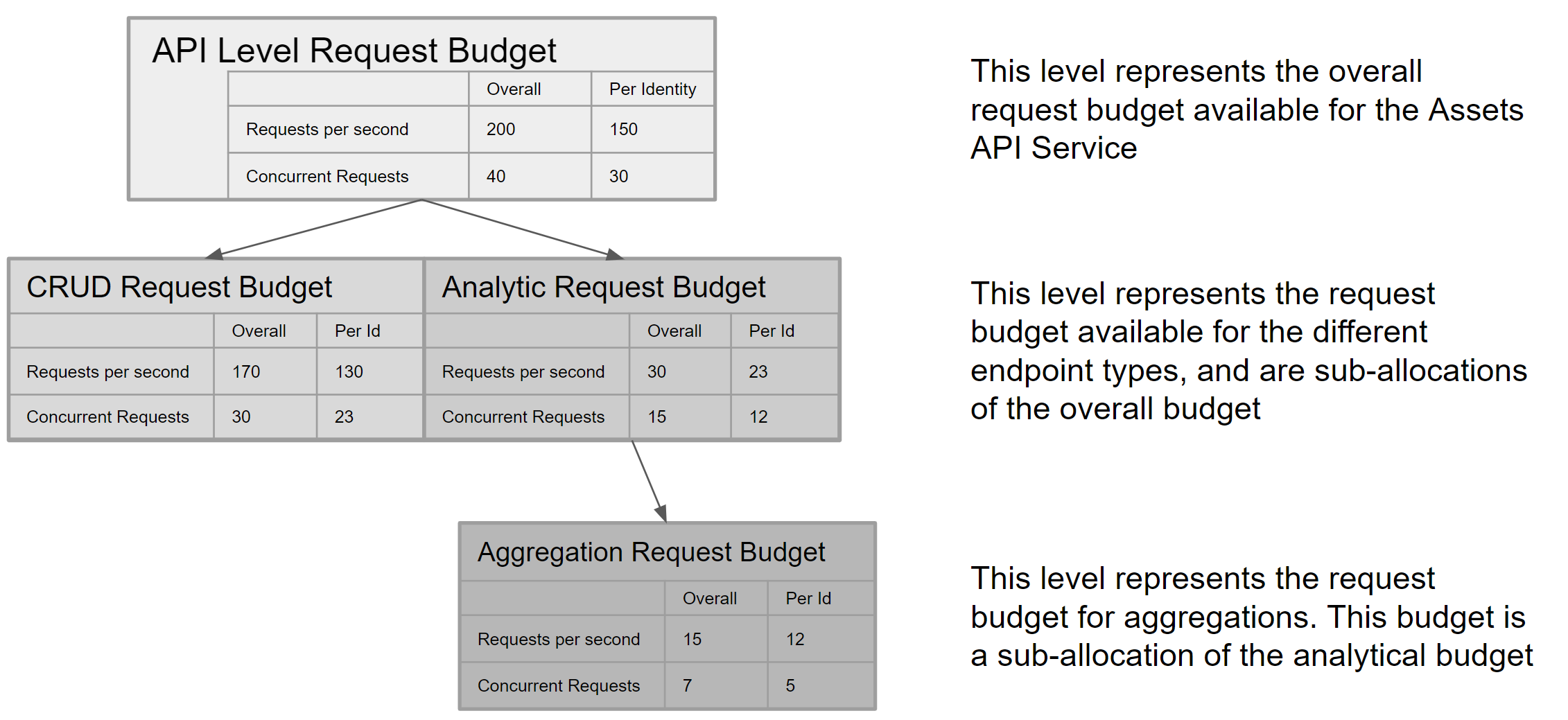
The version 1.0 limits for the overall API service and its constituent endpoints are illustrated in the diagram below.
These limits are subject to change, pending review of changing consumption patterns and resource availability over time:
Translating RPS into data speed
A single request may retrieve up to 1000 items. In the context of Assets, 1 item = 1 asset record
Therefore, the maximum theoretical data speed at the top API service level is 200,000 items per second for all consumers,
and 150,000 for a single identity or client in a project.
Use of Partitions / Parallel Retrieval
As a general guidance, Parallel Retrieval is a technique that should be used where due to query complexity, retrieval of data in a single request session turns out to be slow. By parallelizing such requests, data retrieval performance can be tuned to meet the client application needs. Parallel retrieval may also be used where retrieval of large sets of data is required, up to the capacity limits defined for a given API service. For example (using the Assets API request budget):
- A single request may retrieve up to 1000 items
- Up to 23 requests per second may be issued for an analytical query (per identity), such as when using /list or /filter API endpoints
- This provides a theoretical maximum of 23,000 items read per second per identity
- The query complexity may result in it taking longer than 1s to read or write 1000 items in a single request
- Therefore, it is appropriate to specify the query to retrieve a lower number of items per request, and retrieve more items in parallel, up to the theoretical maximum performance of 23,000 items per second.
Important Note:
Parallel retrieval should be only used in situations where, due to query complexity,
a single request flow provides data retrieval speeds that are significantly less than the theoretical maximum.
Parallel retrieval does not act as a speed multiplier on optimally running queries. Regardless of the number
of concurrent requests issued, the overall requests per second limit still applies.
So for example, a single request returning data at approximately 18,000 items per second will only
benefit from adding a second parallel request, the capacity of which goes somewhat wasted
as only an additional 5,000 items per second will return before the request rate budget limit is reached.
List assets
Required capabilities:
assetsAcl:READ
List all assets, or only the assets matching the specified query.
Request throttling
This endpoint is meant for data analytics/exploration usage and is not suitable for high load data retrieval usage. It is a subject of the new throttling schema (limited request rate and concurrency). Please check Assets resource description for more information.
query Parameters
Paged response with list of assets.
The response for a bad request.
The response for too many requests (concurrency or rate throttling).
- JavaScript SDK
- Python SDK
const assets = await client.assets.list({ filter: { name: '21PT1019' } });
- 200
- 400
- 429
{- "items": [
- {
- "createdTime": 1730204346000,
- "lastUpdatedTime": 1730204346000,
- "rootId": 1,
- "aggregates": {
- "childCount": 0,
- "depth": 0,
- "path": [
- {
- "id": 1
}
]
}, - "parentId": 1,
- "parentExternalId": "my.known.id",
- "externalId": "my.known.id",
- "name": "string",
- "description": "string",
- "dataSetId": 1,
- "metadata": {
- "property1": "string",
- "property2": "string"
}, - "source": "string",
- "labels": [
- {
- "externalId": "my.known.id"
}
], - "geoLocation": {
- "type": "Feature",
- "geometry": {
- "type": "Point",
- "coordinates": [
- 0,
- 0
]
}, - "properties": { }
}, - "id": 1
}
], - "nextCursor": "string"
}Create assets
Required capabilities:
assetsAcl:WRITE
Create multiple asset objects in the same project. It is possible to create a maximum of 1000 assets per request.
Request throttling
This endpoint is a subject of the new throttling schema (limited request rate and concurrency). Please check Assets resource description for more information.
Request Body schema: application/jsonrequired
List of the assets to create. You can create a maximum of 1000 assets per request.
required | Array of objects (DataExternalAssetItem) [ 1 .. 1000 ] items |
Response with list of assets.
The response for a bad request.
The response for too many requests (concurrency or rate throttling).
- Payload
- JavaScript SDK
- Python SDK
- Java SDK
{- "items": [
- {
- "externalId": "my.known.id",
- "name": "string",
- "parentId": 1,
- "parentExternalId": "my.known.id",
- "description": "string",
- "dataSetId": 1,
- "metadata": {
- "property1": "string",
- "property2": "string"
}, - "source": "string",
- "labels": [
- {
- "externalId": "my.known.id"
}
], - "geoLocation": {
- "type": "Feature",
- "geometry": {
- "type": "Point",
- "coordinates": [
- 0,
- 0
]
}, - "properties": { }
}
}
]
}- 201
- 400
- 429
{- "items": [
- {
- "createdTime": 1730204346000,
- "lastUpdatedTime": 1730204346000,
- "rootId": 1,
- "aggregates": {
- "childCount": 0,
- "depth": 0,
- "path": [
- {
- "id": 1
}
]
}, - "parentId": 1,
- "parentExternalId": "my.known.id",
- "externalId": "my.known.id",
- "name": "string",
- "description": "string",
- "dataSetId": 1,
- "metadata": {
- "property1": "string",
- "property2": "string"
}, - "source": "string",
- "labels": [
- {
- "externalId": "my.known.id"
}
], - "geoLocation": {
- "type": "Feature",
- "geometry": {
- "type": "Point",
- "coordinates": [
- 0,
- 0
]
}, - "properties": { }
}, - "id": 1
}
]
}Retrieve an asset by its ID
Required capabilities:
assetsAcl:READ
Retrieve an asset by its internal ID. If you want to retrieve assets by externalIds, use Retrieve assets instead.
Request throttling
This endpoint is a subject of the new throttling schema (limited request rate and concurrency). Please check Assets resource description for more information.
Response with a single asset.
The response for a bad request.
The response for too many requests (concurrency or rate throttling).
- JavaScript SDK
- Python SDK
const assets = await client.assets.retrieve([{id: 123}, {externalId: 'abc'}]);
- 200
- 400
- 429
{- "createdTime": 1730204346000,
- "lastUpdatedTime": 1730204346000,
- "rootId": 1,
- "aggregates": {
- "childCount": 0,
- "depth": 0,
- "path": [
- {
- "id": 1
}
]
}, - "parentId": 1,
- "parentExternalId": "my.known.id",
- "externalId": "my.known.id",
- "name": "string",
- "description": "string",
- "dataSetId": 1,
- "metadata": {
- "property1": "string",
- "property2": "string"
}, - "source": "string",
- "labels": [
- {
- "externalId": "my.known.id"
}
], - "geoLocation": {
- "type": "Feature",
- "geometry": {
- "type": "Point",
- "coordinates": [
- 0,
- 0
]
}, - "properties": { }
}, - "id": 1
}Filter assets
Required capabilities:
assetsAcl:READ
Retrieve a list of assets in the same project. This operation supports pagination by cursor. Apply Filtering and Advanced filtering criteria to select a subset of assets.
Advanced filtering
Advanced filter lets you create complex filtering expressions that combine simple operations,
such as equals, prefix, exists, etc., using boolean operators and, or, and not.
It applies to basic fields as well as metadata.
See the advancedFilter attribute in the example.
See more information about filtering DSL here.
Supported leaf filters
| Leaf filter | Supported fields | Description |
|---|---|---|
containsAll |
Array type fields | Only includes results which contain all of the specified values. {"containsAll": {"property": ["property"], "values": [1, 2, 3]}} |
containsAny |
Array type fields | Only includes results which contain at least one of the specified values. {"containsAny": {"property": ["property"], "values": [1, 2, 3]}} |
equals |
Non-array type fields | Only includes results that are equal to the specified value. {"equals": {"property": ["property"], "value": "example"}} |
exists |
All fields | Only includes results where the specified property exists (has value). {"exists": {"property": ["property"]}} |
in |
Non-array type fields | Only includes results that are equal to one of the specified values. {"in": {"property": ["property"], "values": [1, 2, 3]}} |
prefix |
String type fields | Only includes results which start with the specified value. {"prefix": {"property": ["property"], "value": "example"}} |
range |
Non-array type fields | Only includes results that fall within the specified range. {"range": {"property": ["property"], "gt": 1, "lte": 5}} Supported operators: gt, lt, gte, lte |
search |
["name"], ["description"] |
Introduced to provide functional parity with /assets/search endpoint. {"search": {"property": ["property"], "value": "example"}} |
Search
The search leaf filter provides functional parity with the /assets/search endpoint.
It's available only for the ["description"] and ["name"] properties. When specifying only this filter with no explicit ordering,
behavior is the same as of the /assets/search/ endpoint without specifying filters.
Explicit sorting overrides the default ordering by relevance.
It's possible to use the search leaf filter as any other leaf filter for creating complex queries.
See the search filter in the advancedFilter attribute in the example.
advancedFilter attribute limits
- filter query max depth: 10
- filter query max number of clauses: 100
andandorclauses must have at least one elementpropertyarray of each leaf filter has the following limitations:- number of elements in the array is in the range [1, 2]
- elements must not be blank
- each element max length is 128 symbols
- property array must match one of the existing properties (static or dynamic metadata).
containsAll,containsAny, andinfiltervaluesarray size must be in the range [1, 100]containsAll,containsAny, andinfiltervaluesarray must contain elements of a primitive type (number, string)rangefilter must have at least one ofgt,gte,lt,lteattributes. Butgtis mutually exclusive togte, whileltis mutually exclusive tolte. At least one of the bounds must be specified.gt,gte,lt,ltein therangefilter must be a primitive valuesearchfiltervaluemust not be blank and the length must be in the range [1, 128]- filter query may have maximum 2 search leaf filters
- maximum leaf filter string value length is different depending on the property the filter is using:
externalId- 255name- 128 for thesearchfilter and 255 for other filtersdescription- 128 for thesearchfilter and 255 for other filterslabelsitem - 255source- 128- any
metadatakey - 128
Sorting
By default, assets are sorted by id in the ascending order.
Use the search leaf filter to sort the results by relevance.
Sorting by other fields can be explicitly requested. The order field is optional
and defaults to desc for _score_ and asc for all other fields.
The nulls field is optional and defaults to auto. auto is translated to
last for the asc order and to first for the desc order by the service.
Partitions are done independently of sorting; there's no guarantee of the sort order between elements from different partitions.
See the sort attribute in the example.
Null values
In case the nulls attribute has the auto value or the attribute isn't specified,
null (missing) values are considered to be bigger than any other values.
They are placed last when sorting in the asc order and first when sorting in desc.
Otherwise, missing values are placed according to the nulls attribute (last or first), and their placement doesn't depend on the order value.
Values, such as empty strings, aren't considered as nulls.
Sorting by score
Use a special sort property _score_ when sorting by relevance.
The more filters a particular asset matches, the higher its score is. This can be useful,
for example, when building UIs. Let's assume we want exact matches to be be displayed above matches by
prefix as in the request below. An asset named pump will match both equals and prefix
filters and, therefore, have higher score than assets with names like pump valve that match only prefix filter.
"advancedFilter" : {
  "or" : [
    {
      "equals": {
        "property": ["name"],
        "value": "pump"
      }
    },
    {
      "prefix": {
        "property": ["name"],
        "value": "pump"
      }
    }
  ]
},
"sort": [
  {
    "property" : ["_score_"]
  }
]
Request throttling
This endpoint is meant for data analytics/exploration usage and is not suitable for high load data retrieval usage. It is a subject of the new throttling schema (limited request rate and concurrency). Please check Assets resource description for more information.
Request Body schema: application/json
object (Filter) Filter on assets with strict matching. | |||||||||||||||||||||||||||||
(BoolFilter (and (object) or or (object) or not (object))) or (LeafFilter (equals (object) or in (object) or range (object) or prefix (object) or exists (object) or containsAny (object) or containsAll (object) or search (object))) A filter DSL (Domain Specific Language) to define advanced filter queries. See more information about filtering DSL here. Supported properties:
Note: Filtering on the | |||||||||||||||||||||||||||||
| limit | integer <int32> [ 1 .. 1000 ] Default: 100 Limits the number of results to return. | ||||||||||||||||||||||||||||
Array of objects (AssetSortProperty) [ 1 .. 2 ] items Sort by array of selected properties. | |||||||||||||||||||||||||||||
| cursor | string | ||||||||||||||||||||||||||||
| aggregatedProperties | Array of strings (AggregatedProperty) Set of aggregated properties to include | ||||||||||||||||||||||||||||
| partition | string (PartitionLimited10) Splits the data set into The maximum number of allowed partitions ( Cognite rejects requests if you specify more than 10 partitions. When Cognite enforces this behavior, the requests result in a 400 Bad Request status. |
Paged response with list of assets.
The response for a bad request.
The response for too many requests (concurrency or rate throttling).
- Payload
- JavaScript SDK
- Python SDK
- Java SDK
{- "filter": {
- "name": "string",
- "parentIds": [
- 1
], - "parentExternalIds": [
- "my.known.id"
], - "rootIds": [
- {
- "id": 1
}
], - "assetSubtreeIds": [
- {
- "id": 1
}
], - "dataSetIds": [
- {
- "id": 1
}
], - "metadata": {
- "property1": "string",
- "property2": "string"
}, - "source": "string",
- "createdTime": {
- "max": 0,
- "min": 0
}, - "lastUpdatedTime": {
- "max": 0,
- "min": 0
}, - "root": true,
- "externalIdPrefix": "my.known.prefix",
- "labels": {
- "containsAny": [
- {
- "externalId": "my.known.id"
}
]
}, - "geoLocation": {
- "relation": "INTERSECTS",
- "shape": {
- "type": "Point",
- "coordinates": [
- 0,
- 0
]
}
}
}, - "advancedFilter": {
- "or": [
- {
- "not": {
- "and": [
- {
- "equals": {
- "property": [
- "metadata",
- "asset_type"
], - "value": "gas pump"
}
}, - {
- "in": {
- "property": [
- "source"
], - "values": [
- "blueprint",
- "inventory"
]
}
}, - {
- "range": {
- "property": [
- "dataSetId"
], - "gte": 1,
- "lt": 10
}
}
]
}
}, - {
- "and": [
- {
- "containsAny": {
- "property": [
- "labels"
], - "values": [
- "pump",
- "cooler"
]
}
}, - {
- "equals": {
- "property": [
- "parentId"
], - "value": 95867294876
}
}
]
}, - {
- "search": {
- "property": [
- "description"
], - "value": "My favorite pump"
}
}
]
}, - "limit": 100,
- "sort": [
- {
- "property": [
- "createdTime"
], - "order": "desc"
}, - {
- "property": [
- "metadata",
- "customMetadataKey"
], - "nulls": "first"
}
], - "cursor": "4zj0Vy2fo0NtNMb229mI9r1V3YG5NBL752kQz1cKtwo",
- "aggregatedProperties": [
- "childCount"
], - "partition": "1/3"
}- 200
- 400
- 429
{- "items": [
- {
- "createdTime": 1730204346000,
- "lastUpdatedTime": 1730204346000,
- "rootId": 1,
- "aggregates": {
- "childCount": 0,
- "depth": 0,
- "path": [
- {
- "id": 1
}
]
}, - "parentId": 1,
- "parentExternalId": "my.known.id",
- "externalId": "my.known.id",
- "name": "string",
- "description": "string",
- "dataSetId": 1,
- "metadata": {
- "property1": "string",
- "property2": "string"
}, - "source": "string",
- "labels": [
- {
- "externalId": "my.known.id"
}
], - "geoLocation": {
- "type": "Feature",
- "geometry": {
- "type": "Point",
- "coordinates": [
- 0,
- 0
]
}, - "properties": { }
}, - "id": 1
}
], - "nextCursor": "string"
}Aggregate assets
Required capabilities:
assetsAcl:READ
The aggregation API lets you compute aggregated results on assets, such as getting the count of all assets in a project, checking different names and descriptions of assets in your project, etc.
Aggregate filtering
Filter (filter & advancedFilter) data for aggregates
Filters behave the same way as for the Filter assets endpoint.
In text properties, the values are aggregated in a case-insensitive manner.
aggregateFilter to filter aggregate results
aggregateFilter works similarly to advancedFilter but always applies to aggregate properties.
For instance, in case of an aggregation for the source property, only the values (aka buckets) of the source property can be filtered out.
Request throttling
This endpoint is meant for data analytics/exploration usage and is not suitable for high load data retrieval usage.
It is a subject of the new throttling schema (limited request rate and concurrency).
Please check Assets resource description for more information.
Request Body schema: application/json
Request aggregate to count number of Assets matching the filters. Default aggregate for the endpoint.
| aggregate | string Type of aggregation to apply.
| ||||||||||||||||||||||||||||
(BoolFilter (and (object) or or (object) or not (object))) or (LeafFilter (equals (object) or in (object) or range (object) or prefix (object) or exists (object) or containsAny (object) or containsAll (object) or search (object))) A filter DSL (Domain Specific Language) to define advanced filter queries. See more information about filtering DSL here. Supported properties:
Note: Filtering on the | |||||||||||||||||||||||||||||
object (Filter) Filter on assets with strict matching. |
Response with a list of aggregation results.
The response for a bad request.
The response for too many requests (concurrency or rate throttling).
- Payload
- JavaScript SDK
- Python SDK
- Java SDK
{- "aggregate": "count",
- "advancedFilter": {
- "or": [
- {
- "not": {
- "and": [
- {
- "equals": {
- "property": [
- "metadata",
- "asset_type"
], - "value": "gas pump"
}
}, - {
- "in": {
- "property": [
- "source"
], - "values": [
- "blueprint",
- "inventory"
]
}
}, - {
- "range": {
- "property": [
- "dataSetId"
], - "gte": 1,
- "lt": 10
}
}
]
}
}, - {
- "and": [
- {
- "containsAny": {
- "property": [
- "labels"
], - "values": [
- "pump",
- "cooler"
]
}
}, - {
- "equals": {
- "property": [
- "parentId"
], - "value": 95867294876
}
}
]
}, - {
- "search": {
- "property": [
- "description"
], - "value": "My favorite pump"
}
}
]
}, - "filter": {
- "name": "string",
- "parentIds": [
- 1
], - "parentExternalIds": [
- "my.known.id"
], - "rootIds": [
- {
- "id": 1
}
], - "assetSubtreeIds": [
- {
- "id": 1
}
], - "dataSetIds": [
- {
- "id": 1
}
], - "metadata": {
- "property1": "string",
- "property2": "string"
}, - "source": "string",
- "createdTime": {
- "max": 0,
- "min": 0
}, - "lastUpdatedTime": {
- "max": 0,
- "min": 0
}, - "root": true,
- "externalIdPrefix": "my.known.prefix",
- "labels": {
- "containsAny": [
- {
- "externalId": "my.known.id"
}
]
}, - "geoLocation": {
- "relation": "INTERSECTS",
- "shape": {
- "type": "Point",
- "coordinates": [
- 0,
- 0
]
}
}
}
}- 200
- 400
- 429
{- "items": [
- {
- "count": 10
}
]
}Retrieve assets
Required capabilities:
assetsAcl:READ
Retrieve assets by IDs or external IDs. If you specify to get aggregates, then be aware that the aggregates are eventually consistent.
Request throttling
This endpoint is a subject of the new throttling schema (limited request rate and concurrency). Please check Assets resource description for more information.
Request Body schema: application/jsonrequired
All provided IDs and external IDs must be unique.
Response with list of assets.
The response for a bad request.
The response for too many requests (concurrency or rate throttling).
- Payload
- JavaScript SDK
- Python SDK
- Java SDK
{- "items": [
- {
- "id": 1
}
], - "ignoreUnknownIds": false,
- "aggregatedProperties": [
- "childCount"
]
}- 200
- 400
- 429
{- "items": [
- {
- "createdTime": 1730204346000,
- "lastUpdatedTime": 1730204346000,
- "rootId": 1,
- "aggregates": {
- "childCount": 0,
- "depth": 0,
- "path": [
- {
- "id": 1
}
]
}, - "parentId": 1,
- "parentExternalId": "my.known.id",
- "externalId": "my.known.id",
- "name": "string",
- "description": "string",
- "dataSetId": 1,
- "metadata": {
- "property1": "string",
- "property2": "string"
}, - "source": "string",
- "labels": [
- {
- "externalId": "my.known.id"
}
], - "geoLocation": {
- "type": "Feature",
- "geometry": {
- "type": "Point",
- "coordinates": [
- 0,
- 0
]
}, - "properties": { }
}, - "id": 1
}
]
}Update assets
Required capabilities:
assetsAcl:WRITE
Update the attributes of assets.
Request throttling
This endpoint is a subject of the new throttling schema (limited request rate and concurrency). Please check Assets resource description for more information.
Request Body schema: application/jsonrequired
All provided IDs and external IDs must be unique. Fields that aren't included in the request aren't changed.
required | Array of AssetChangeById (object) or AssetChangeByExternalId (object) (AssetChange) [ 1 .. 1000 ] items |
Response with list of assets.
The response for a bad request.
The response for too many requests (concurrency or rate throttling).
- Payload
- JavaScript SDK
- Python SDK
- Java SDK
{- "items": [
- {
- "update": {
- "externalId": {
- "set": "my.known.id"
}, - "name": {
- "set": "string"
}, - "description": {
- "set": "string"
}, - "dataSetId": {
- "set": 0
}, - "metadata": {
- "set": {
- "key1": "value1",
- "key2": "value2"
}
}, - "source": {
- "set": "string"
}, - "parentId": {
- "set": 1
}, - "parentExternalId": {
- "set": "my.known.id"
}, - "labels": {
- "add": [
- {
- "externalId": "my.known.id"
}
], - "remove": [
- {
- "externalId": "my.known.id"
}
]
}, - "geoLocation": {
- "set": {
- "type": "Feature",
- "geometry": {
- "type": "Point",
- "coordinates": [
- null,
- null
]
}, - "properties": { }
}
}
}, - "id": 1
}
]
}- 200
- 400
- 429
{- "items": [
- {
- "createdTime": 1730204346000,
- "lastUpdatedTime": 1730204346000,
- "rootId": 1,
- "aggregates": {
- "childCount": 0,
- "depth": 0,
- "path": [
- {
- "id": 1
}
]
}, - "parentId": 1,
- "parentExternalId": "my.known.id",
- "externalId": "my.known.id",
- "name": "string",
- "description": "string",
- "dataSetId": 1,
- "metadata": {
- "property1": "string",
- "property2": "string"
}, - "source": "string",
- "labels": [
- {
- "externalId": "my.known.id"
}
], - "geoLocation": {
- "type": "Feature",
- "geometry": {
- "type": "Point",
- "coordinates": [
- 0,
- 0
]
}, - "properties": { }
}, - "id": 1
}
]
}Search assets
Required capabilities:
assetsAcl:READ
Fulltext search for assets based on result relevance. Primarily meant for human-centric use-cases, not for programs, since matching and ordering may change over time. Additional filters can also be specified. This operation doesn't support pagination.
Request throttling
This endpoint is meant for data analytics/exploration usage and is not suitable for high load data retrieval usage. It is a subject of the new throttling schema (limited request rate and concurrency). Please check Assets resource description for more information.
Request Body schema: application/jsonrequired
Search query
Response with list of assets.
The response for a bad request.
The response for too many requests (concurrency or rate throttling).
- Payload
- JavaScript SDK
- Python SDK
{- "filter": {
- "parentIds": [
- 1293812938,
- 293823982938
]
}, - "search": {
- "name": "flow",
- "description": "upstream"
}
}- 200
- 400
- 429
{- "items": [
- {
- "createdTime": 1730204346000,
- "lastUpdatedTime": 1730204346000,
- "rootId": 1,
- "aggregates": {
- "childCount": 0,
- "depth": 0,
- "path": [
- {
- "id": 1
}
]
}, - "parentId": 1,
- "parentExternalId": "my.known.id",
- "externalId": "my.known.id",
- "name": "string",
- "description": "string",
- "dataSetId": 1,
- "metadata": {
- "property1": "string",
- "property2": "string"
}, - "source": "string",
- "labels": [
- {
- "externalId": "my.known.id"
}
], - "geoLocation": {
- "type": "Feature",
- "geometry": {
- "type": "Point",
- "coordinates": [
- 0,
- 0
]
}, - "properties": { }
}, - "id": 1
}
]
}Delete assets
Required capabilities:
assetsAcl:WRITE
Delete assets. By default, recursive=false and the request would fail if attempting to delete assets that are referenced as parent by other assets.
To delete such assets and all its descendants, set recursive to true.
The limit of the request does not include the number of descendants that are deleted.
Request throttling
This endpoint is a subject of the new throttling schema (limited request rate and concurrency). Please check Assets resource description for more information.
Request Body schema: application/jsonrequired
Empty response.
The response for a bad request.
The response for too many requests (concurrency or rate throttling).
- Payload
- JavaScript SDK
- Python SDK
- Java SDK
{- "items": [
- {
- "id": 1
}
], - "recursive": false,
- "ignoreUnknownIds": false
}- 200
- 400
- 429
{ }